
Questions about your ad or sharing your events?
Find your answers here!
To make sure only real businesses can join, we make sure to check every business that applies to add events on Enjoyn is a real business. This may take up to 48 hours. After this you will be able to add events like anyone else.
Do you think anything went wrong? Please email support@enjoynspain.com.
When you are logged in with the user who owns the business the event is for, you will be able to find the business information in the business hub. You can open the hub by clicking the menu button in the top left screen, and then select your business.
Open the Ad tab if not opened yet. Just right of 'Business details', you can find three dots. By clicking on these you can select 'update business details' and start editing.
To add an event, you need to have a business attached to your Enjoyn user account. Once you logged in with this account you see your business in the menu.
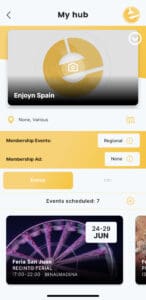
If your business is approved for Enjoyn and has an events membership, you will see a tab that states 'Events' on the lower half of your hub. Next to 'Events scheduled: #', you will find a plus symbol. By clicking this, you will be guided through the steps to add your event.
When you are logged in with the user who owns the business the event is for, you will be able to find the event in your business hub. You can open the hub by clicking the button on the main screens in the right bottom corner.
Open the Events tab if not opened yet. Once you find your event in your event list you can click on it. This will give you several options, and the option to update the event.
When you are logged in with the user who owns the business the event is for, you will be able to find the event in your business hub. You can open the hub by clicking the button on the main screens in the right bottom corner.
Open the Events tab if not opened yet. Once you find your event you can click on it. This will give you several options, and the option to delete the event.
If you have multiple business you will have the option to select which business you want to manage. In the hub, you will see a representation of you business (logo). If you click on this, you can see all businesses managed by you and select a different business that you want to manage events for.

To make sure only real businesses can join, we make sure to check every business that applies to add events on Enjoyn is a real business. If we have reason to believe this is not a real business, not created by the owner, or data entered was invalid, we will reject the business.
Do you think the business should not have been rejected? Please email support@enjoynspain.com.
This could be because the business does not exist anymore, we have been asked to cancel this account, o rthe subscription has expired.
Do you think the business should not have status cancelled/expired? Please email support@enjoynspain.com.